EXTRA MODULES – PRIVACY CENTRE
THE PRIVACY CENTRE
The Privacy Centre allows customer administrators to manage the privacy responsibilities of the organization from one central place.
From the Privacy Centre, you can search for stored data on Logit users, or other persons that are stored in your Logit database.
To be able to access the Privacy Centre you need to be logged in with the role of Customer admin (General/The Difference Between User Roles).
Click on the settings icon and then click on the Privacy Centre.
After entering the Privacy Centre, you can start searching for Logit users, or mentions of names in the logs.
SEARCH FOR MENTIONS OF A PERSON
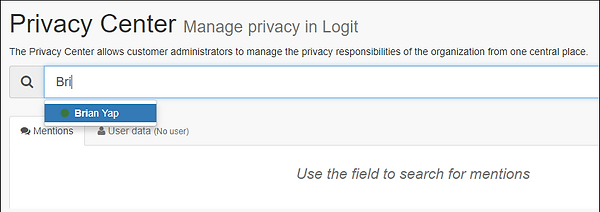
When you start typing a name of a person with a Logit user, you will immediately get a suggestion in the search field. Click on the user you are searching for.
You can also search for persons that have been mentioned in a log but are not Logit users. An example here can be a log where sensitive information regarding a person’s situation has been mentioned. By using the Privacy Centre’s search functionality, you will easily be able to view all places where specific information has been registered.
After entering your search data, you will then see a list of all logs where the specific user/person has left data in any form.
When you click on a specific log, you will see the user's name highlighted wherever the user is found in the data. This can be:
-
Log posts the user has submitted or is linked to
-
Tasks the user has created or has been assigned to
-
Incidents the user has participated in
If there has been raised a request that a person's data should be removed from the log data, you can easily do this by using the Privacy Centre. After you have searched for the specific person, you can redact specific mentions of the user in the log data.
Click "Replace" next to the mention of the person, and the name will be replaced with "[redacted]".
Repeat the step to redact all the mentions that you would like to remove. After you have completed the redactions, you need to click "Update mentions", to write the changes to the log data. This is an irreversible process since the user's data will be permanently removed from Logit’s servers.
It is also possible to download the raw data with the person's data. This is data as presented in the system's database.
USER DATA
If you have searched for a Logit user, you can click on the tab labelled "User data". This list all the logs where the user has participated. It also lists the teams of which the user is a part.
In this section, you can download all the data in Logit that exist on the specific user. And you can also anonymize the user's data. This is normally not something you would do, but would only be necessary for two reasons:
-
A Logit user request that all their data stored in Logit should be deleted. This functionality is also required in GDPR (links to Logit’s GDPR).
-
An administrator would like to remove all traces of a specific user in the system.
It is not possible to anonymize active Logit users. So, you will first need to remove the user in the "Account settings", to anonymize the user's data.